 HitchDays
Short answer
You answer five questions, HitchDays shows your countdown and the next three changes, and from then on it works out every hitch and home day on your iPhone from one rule: the number of days since the first day of a hitch, divided into your days on and days off. Nothing is uploaded, and there is no account.
Five questions, then your countdown
Pidge, a homing pigeon, asks each question in a speech bubble. Tapping an answer selects it; you move on with Continue, so you can change your mind.
Which of these sounds like you?
My family keeps asking when I'm home. I lose count of the days to crew change. My day off moves every week. I never know when my partner is back. This sets the countdown's words.
What rotation are you on?
14 and 14, 28 and 28, 2 and 1, 4 on 4 off, or rotating day off. Pick the closest; the exact numbers can change later.
What kind of day is today?
A work day, a day off, crew change heading out, or crew change heading home. If it's your partner's rotation, answer for them.
Which day of this stretch is today?
The first day away or the first day home is day 1. If you answered crew change, today already is day 1.
Who needs to see it?
Just me, my partner, my kids, or my crew. This sets the caption on the calendar and the title of the share card.
Then Pidge says "Here's your countdown." You see the number, your next three changes, and this month, all from your answers, before any mention of a subscription. Open my calendar takes you to the home screen.
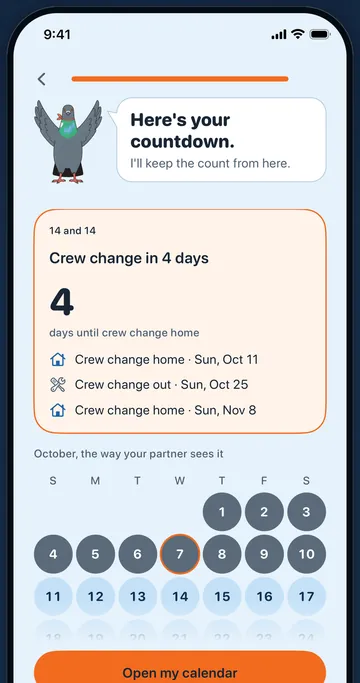
Where today sits is all it needs
Most people on a rotation know "I'm on day 9" faster than they can find the date the hitch started. HitchDays uses that: day 9 of a 14 and 14 means the hitch started 8 days ago, and from that date it can lay out every hitch and home day forward and back. If your answer was a day off, it counts back through the home stretch instead.
The home screen
- The countdown in big type, with the date and "Day 9 of 14 on hitch". More about the countdown.
- Next up: your next change, plus the two after it with HitchDays Pro.
- The month calendar: this week and next in slate and sky blue, with a legend for hitch days, home days, and today. More about the calendar.
- Edit my schedule under the calendar, and a labeled Edit button at the top, both open the editor.
- A card to send the month to the person you picked in setup, and a card with days worked this month. Both come with HitchDays Pro.
Changing the schedule
The editor shows the next 14 days as you change things, so you can see the result before you save. Common changes:
- The count is a day off. Move the First hitch day by one day.
- You're held over a week. Move the First hitch day so today sits on the right day, or set this hitch's days on to match and set it back after.
- The company changes your rotation. Pick the new pattern or set new numbers, and set the First hitch day of the new pattern.
What is worked out on the phone
Every date comes from one rule that runs on your iPhone: count the whole calendar days from the first hitch day to the day in question, take the remainder after dividing by the full cycle (28 for 14 and 14), and it's a hitch day if that remainder is less than your days on. That is why the app gives the same answer in airplane mode, across month ends, and through daylight saving changes. The rotation calculator on this site uses the same rule.
Your rotation and settings are saved on your iPhone, with a small copy in a shared folder on the same phone so the widgets can draw the countdown. The app goes online only for HitchDays Pro: Apple handles the purchase, and RevenueCat records it under an anonymous ID. The privacy policy has the details.
Free and Pro
Everything above is free except where it says HitchDays Pro. Pro is $14.99 a year after a 7-day free trial, or $2.99 a month, and the paywall only appears when you tap something that needs it: a lock, a blurred part of the calendar, the share card, or the Pro row in Settings. It never appears after setup. See pricing.