 HitchDays
Short answer
HitchDays is a rotation calendar for iPhone that fills in every month from one pattern and one date. It has presets for 14 and 14, 14 and 21, 28 and 28, 7 and 7, 4 on 4 off, and 2 and 1, takes any days on and off from 1 to 120, and has a weekly type for fixed days off with a rotating weekday. This week and next are free; the whole month and every month ahead come with HitchDays Pro.
Patterns you can pick
| Preset in the app | Days on, days off | Often called |
|---|---|---|
| 14 and 14 | 14 on, 14 off | 14/14, two and two, even time |
| 14 and 21 | 14 on, 21 off | 14/21 |
| 28 and 28 | 28 on, 28 off | 28/28, four and four |
| 7 and 7 | 7 on, 7 off | 7/7, week on week off |
| 4 on, 4 off | 4 on, 4 off | 4/4, four on four off |
| 2 and 1 | 14 on, 7 off | 2/1, 14/7, two weeks on one off |
| Your own | 1 to 120 on, 1 to 120 off | 21/21, 20/10, 8/6, 10/4, 5/2 and the rest |
For a weekly schedule, switch the editor to Same days off each week, tick the weekdays you always have off, and turn on One weekday off that rotates if you have one. That weekday moves one day later each week, Monday through Saturday, then starts over. Postal carriers should read the note further down this page first.
Not sure what your numbers mean, or whether 2/1 is weeks or days? Rotation schedules explained has a table of the common ones.
Edit the schedule and watch the next 14 days redraw
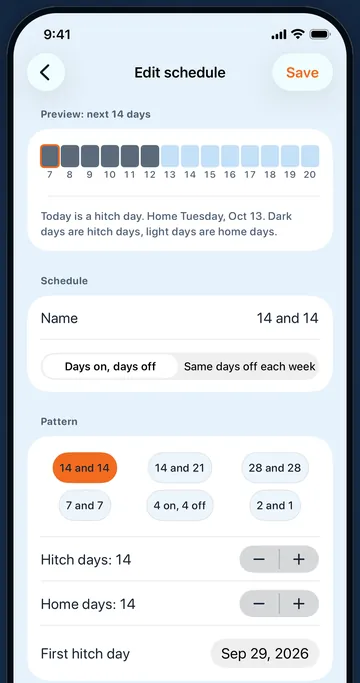
Tap Edit my schedule under the calendar, or the Edit button at the top of the home screen. The editor shows Preview: next 14 days as a strip of slate and sky squares with today outlined, and a plain sentence under it, such as "Today is a hitch day. Home Tuesday, Oct 13." Change the pattern, the number of hitch days or home days, or the First hitch day, and the strip and the sentence change before you save.
The First hitch day can be the first day of any hitch, past or future. If you only know that today is day 9, the setup questions work it out for you.
The month calendar
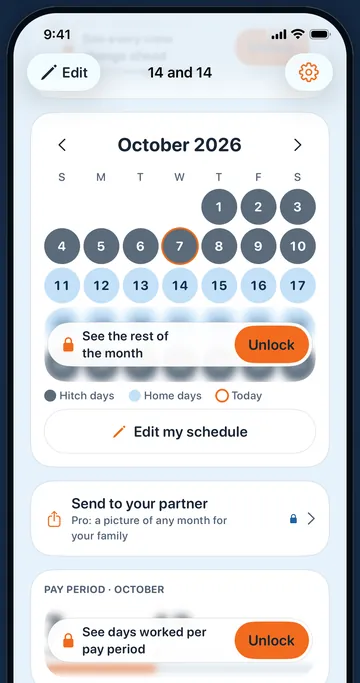
Each day is a fixed square with its number in the middle: slate for hitch days, sky blue for home days, and an orange ring for today. A legend under the grid says which is which. Swipe or tap the arrows to change month.
The free version shows this week and next week clearly. The rest of the current month, and any other month, shows your real days blurred with a button that opens HitchDays Pro. With Pro you can look as far ahead as you like, which is how people check a wedding, a school play, or Christmas against a 28 and 28.
Oilfield, offshore, FIFO, fire crews, and plants
The words differ by trade and the math does not. An oilfield hand on a 14 and 14 hitch, an offshore worker on 28/28, a FIFO miner on a 2/1 swing, and a firefighter on 4 on 4 off all have a fixed number of days on followed by a fixed number off, repeating. HitchDays only needs those two numbers and one date. It does not need to know your company, your rig, or your site, and it never asks.
Weekly schedules with a rotating day off
The weekly type keeps your fixed days off, Sunday for example, plus one weekday that moves one day later each week. HitchDays counts those weeks from Sunday. Postal color calendars count the service week from Saturday, so for a postal carrier five of every six rotating days line up and the Saturday lands one week later in HitchDays. Check your Saturdays against your station's calendar. The USPS rotating day off guide explains the six-week cycle.
More than one rotation, days worked, and hitch colors
These come with HitchDays Pro:
- More than one rotation. Keep two jobs, or your own rotation and your partner's, each with its own name. Touch and hold the Edit button on the home screen to switch.
- Days worked this month. A card under the calendar counts your hitch days this month, so far and by month end, which is handy for checking a pay period.
- Hitch day colors. Slate is free. Pro adds rust, pine, and plum, so two rotations look different at a glance.
If you stop paying for Pro, every rotation you made stays in the app; you can still view and delete them.