 HitchDays
For 14/14, 20/10, 28/14, 28/28, 2 and 1, and rotating days off
The hitch calendar that counts the days until you're home
HitchDays is an iPhone app for people who work a rotation and the people at home who wait for them. Enter your rotation once and the first screen shows how many days until you're home, the date, and which day of the hitch today is. Your partner can run the same countdown on their phone, worded "They're home in 6 days".
Free to download. iPhone, iOS 17 or later. No account, no login, works with no signal.

Days until home
6
Home · Tue, Oct 13
Day 9 of 14 on hitch
- Hitch days
- Home days
- Today
The problem
Your family keeps asking when you're home, and you keep counting on your fingers
It's day 9 of a 14 and 14 and your partner texts to ask whether you'll be home for the wedding on the 22nd. You scroll back to the last crew change in the phone calendar and count forward, then do it again on Sunday when your mom asks the same thing. The paper calendar on the fridge is right until the company moves a crew change or holds you over a week, and the person at home ends up doing the same math from the other end.
What HitchDays does
A countdown, a rotation calendar, and a way to send it home
Days until home, in big type Free
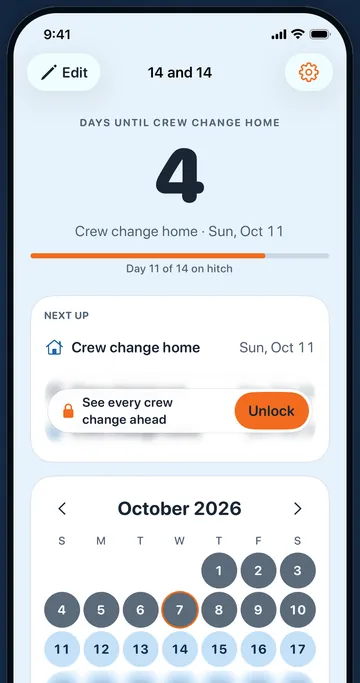
One number: days until home, or days until your next hitch when you're already home. Under it, the date and where you are, like "Day 9 of 14 on hitch". It turns over at midnight and needs no signal. It does not know when the company moves your crew change; you move the date.
How the countdown works14/14, 28/28, or your own pattern
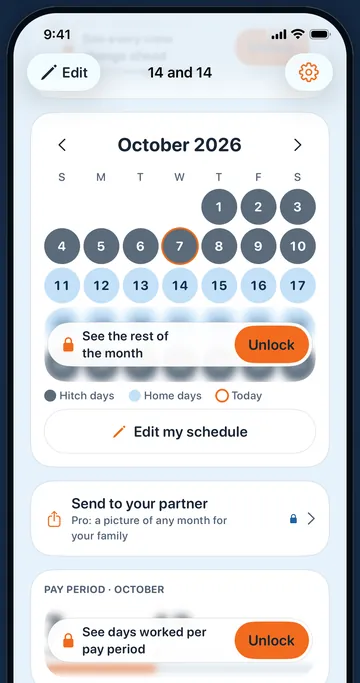
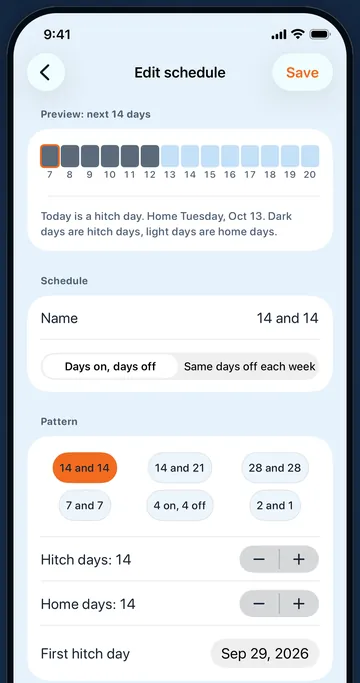
Start from 14 and 14, 14 and 21, 28 and 28, 7 and 7, 4 on 4 off, or 2 and 1, or set days on and off from 1 to 120. A weekly type keeps fixed days off plus one weekday that moves each week. Hitch days are slate, home days sky blue. This week and next are free; the whole month is Pro.
The rotation calendarThe same dates for the people at home
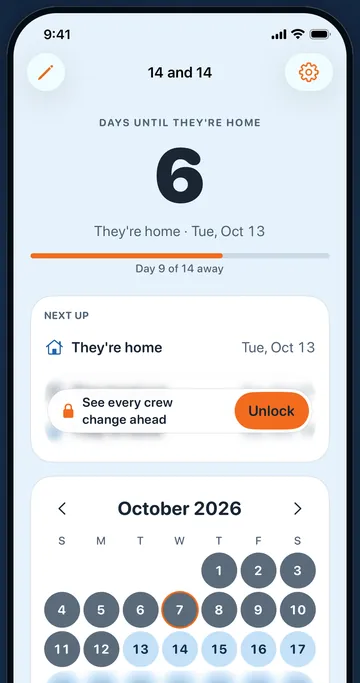
Your partner can enter your rotation and see "They're home in 6 days" on their own phone, free. With HitchDays Pro you can send a picture of any month to the family chat, or put your next 12 crew changes into the iPhone Calendar app. There is no sync between phones.
Sharing with familyWhy it's different
Built around the day you're home, not around a shift planner
- The countdown is the home screen. Shift calendars make you read a grid and count. HitchDays shows the number first and the grid under it.
- It talks the way your house does. Pick home and hitch, day off and work, crew change, or the partner's words: "They're home in 6 days".
- Exact to the day. Days are counted as whole calendar days on your iPhone, so month ends and daylight saving never move a crew change.
- Works on the rig and offshore. Every date is worked out on the phone. Airplane mode changes nothing.
- No account. Your rotation stays on your iPhone. The only thing that leaves it is subscription information, recorded by RevenueCat under an anonymous ID.
- Honest about what it knows. It knows the pattern you give it. It is not your company's roster and does not hear about holdovers or weather.
Screens from the app
What HitchDays looks like on an iPhone
These are real screens from HitchDays on a 14 and 14 rotation. The blurred parts are what the free version keeps behind HitchDays Pro.
Free
What you get without paying
- One rotation in any pattern
- The days-until-home countdown with the date and your next change
- This week and next week on the month calendar
- Countdown words that fit your house, including the partner's
- The small Home Screen widget
HitchDays Pro
$14.99 a year after a 7-day free trial, or $2.99 a month
Pro adds the whole month and any month ahead, your next three changes instead of one, month pictures to send to family, Add to Calendar, a reminder the evening before each change, more than one rotation, days worked this month, more hitch colors, and the medium and Lock Screen widgets.
HitchDays Pro renews automatically until you cancel. The yearly plan charges $14.99 when the 7-day trial ends unless you cancel at least 24 hours before; the monthly plan charges $2.99 each month. Cancel in iPhone Settings, your name, Subscriptions. Full pricing and terms.
How it works
Set up your rotation in five questions
Say what's going on
Pidge, the homing pigeon, asks which of these sounds like you: your family keeps asking when you're home, you lose count of the days to crew change, your day off moves every week, or you never know when your partner is back. Your answer sets the countdown's words.
Pick the rotation and where today sits
Choose 14 and 14, 28 and 28, 2 and 1, 4 on 4 off, or rotating day off, then say whether today is a work day, a day off, or a crew change, and which day of the stretch it is. That one number places the whole year.
Open your calendar
You see your countdown, the next three changes, and this month before anything else. Tap Open my calendar and you're on the home screen. Add the free widget and the number sits on your Home Screen.
Free tool
Check a rotation in your browser
The rotation calculator takes a pattern and the first day of any hitch and shows days until home, the next six changes, and three months colored by hitch and home days. It makes a link you can send to someone at home, Android phones included.
Guides
Rotation guides, answer first
Before you download
Questions people ask about HitchDays
Does it work with no signal on the rig?
Yes. Dates are worked out on the iPhone, so the countdown, calendar, widget, and reminders all work in airplane mode. More
Can my partner see my rotation?
They can install HitchDays and enter the same rotation, free. Pro adds month pictures and Add to Calendar. Nothing syncs on its own. More
The company moved my crew change. Now the count is wrong?
Open Edit my schedule and move the First hitch day. The countdown, calendar, and widget follow at once. More
Is there an Android version?
No, HitchDays is iPhone only. The rotation calculator on this site works in any browser. More
Know the day you're home without counting
Free to download for iPhone. The countdown, this week and next, and the small widget cost nothing. No account.